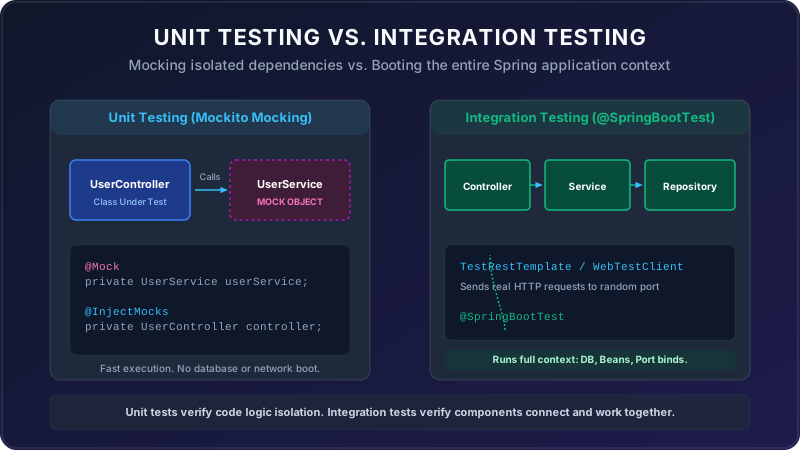
In modern software engineering, writing automated tests is just as important as writing the application code itself. Spring Boot makes testing highly structured by separating tests into Unit Tests (which verify single classes in isolation using Mockito mocks) and Integration Tests (which boot up the full Spring context to verify how all components work together).
Let's look at how we test a User Registration system using simple real-world analogies.
How do we make sure our application works in both good times and bad times? We design tests for both the Happy Path (correct inputs) and the Sad Path (failures/invalid states):
1. Unit Testing with Mocking (The Crash Test Dummy)
Imagine you want to test if a car's seatbelt (the Service) works. You don't put a real human driver in a real car and crash it on a highway. Instead, you put a crash test dummy (a Mock) in a mock seatbelt holder inside a lab:
- Happy Path: You click the seatbelt (method call). The dummy locks in place safely (assert true).
- Sad Path: You try to click it with a dummy that is too large or out of position (bad input). The seatbelt fails to click and trigger an alarm (throws expected validation exception).
2. Integration Testing (The Movie Set Rehearsal)
Before filming a complex scene, the movie crew does a full dress rehearsal (Integration Test) on the actual set (Spring context) with all components active—actors, cameras, lighting, and props:
- Happy Path: The main actor (the Controller) walks in, orders food from the waiter (the Service), and pays at the cash register (the Database). Everything goes smoothly from start to finish.
- Sad Path: The actor walks in, but tries to pay with a fake check (invalid registration/duplicate email). The register alarms, the waiter rejects it, and the actor is thrown out (assert correct error code propagates through all layers).
The Application Code
Let's look at the simple User Registration codebase we want to test. It contains a Service layer and a Controller layer:
// User Entity
public class User {
    private String email;
    private String name;

    public User(String email, String name) {
        this.email = email;
        this.name = name;
    }
    public String getEmail() { return email; }
    public String getName() { return name; }
}

// Custom Exception for duplicate emails (Sad Path)
public class DuplicateEmailException extends RuntimeException {
    public DuplicateEmailException(String message) { super(message); }
}

// User Service
public class UserService {
    private final UserRepository userRepository;

    public UserService(UserRepository userRepository) {
        this.userRepository = userRepository;
    }

    public User registerUser(User user) {
        if (user.getName() == null || user.getName().isBlank()) {
            throw new IllegalArgumentException("Name cannot be blank");
        }
        if (userRepository.existsByEmail(user.getEmail())) {
            throw new DuplicateEmailException("Email already exists");
        }
        return userRepository.save(user);
    }
}

// User Controller
@RestController
@RequestMapping("/users")
public class UserController {
    private final UserService userService;

    public UserController(UserService userService) {
        this.userService = userService;
    }

    @PostMapping
    public ResponseEntity<User> register(@RequestBody User user) {
        try {
            User registered = userService.registerUser(user);
            return ResponseEntity.status(HttpStatus.CREATED).body(registered);
        } catch (IllegalArgumentException e) {
            return ResponseEntity.status(HttpStatus.BAD_REQUEST).build();
        } catch (DuplicateEmailException e) {
            return ResponseEntity.status(HttpStatus.CONFLICT).build();
        }
    }
}
1. Service Unit Test (Mockito Mocking)
We test UserService in isolation. We replace UserRepository with a mock double to
check the logic, testing both the happy registration and the duplicate email conflict:
@ExtendWith(MockitoExtension.class)
public class UserServiceTest {

    @Mock
    private UserRepository userRepository;

    @InjectMocks
    private UserService userService;

    @Test
    void registerUser_HappyPath_ReturnsSavedUser() {
        // Arrange (Setup mock behavior)
        User inputUser = new User("alice@gmail.com", "Alice");
        Mockito.when(userRepository.existsByEmail("alice@gmail.com")).thenReturn(false);
        Mockito.when(userRepository.save(inputUser)).thenReturn(inputUser);

        // Act
        User result = userService.registerUser(inputUser);

        // Assert
        Assertions.assertNotNull(result);
        Assertions.assertEquals("Alice", result.getName());
    }

    @Test
    void registerUser_SadPath_ThrowsDuplicateEmailException() {
        // Arrange
        User duplicateUser = new User("alice@gmail.com", "Alice");
        Mockito.when(userRepository.existsByEmail("alice@gmail.com")).thenReturn(true);

        // Act & Assert
        Assertions.assertThrows(DuplicateEmailException.class, () -> {
            userService.registerUser(duplicateUser);
        });
    }
}
2. Controller Unit Test (MockMvc WebMvcTest)
To test Web routing and API HTTP codes without booting the whole database, we use MockMvc and
@WebMvcTest. We mock the UserService component:
@WebMvcTest(UserController.class)
public class UserControllerTest {

    @Autowired
    private MockMvc mockMvc;

    @MockBean
    private UserService userService;

    @Autowired
    private ObjectMapper objectMapper;

    @Test
    void registerUserController_HappyPath_Returns201Created() throws Exception {
        User inputUser = new User("bob@gmail.com", "Bob");
        Mockito.when(userService.registerUser(Mockito.any(User.class))).thenReturn(inputUser);

        mockMvc.perform(post("/users")
                .contentType(MediaType.APPLICATION_JSON)
                .content(objectMapper.writeValueAsString(inputUser)))
                .andExpect(status().isCreated())
                .andExpect(jsonPath("$.name").value("Bob"));
    }

    @Test
    void registerUserController_SadPath_BlankNameReturns400BadRequest() throws Exception {
        User invalidUser = new User("bob@gmail.com", ""); // Blank Name
        Mockito.when(userService.registerUser(Mockito.any(User.class)))
               .thenThrow(new IllegalArgumentException("Name cannot be blank"));

        mockMvc.perform(post("/users")
                .contentType(MediaType.APPLICATION_JSON)
                .content(objectMapper.writeValueAsString(invalidUser)))
                .andExpect(status().isBadRequest());
    }
}
3. Full Integration Test (@SpringBootTest)
To test the entire database connection, wiring, and API call together, we launch a real HTTP port using
@SpringBootTest. We make a real HTTP request using TestRestTemplate:
@SpringBootTest(webEnvironment = SpringBootTest.WebEnvironment.RANDOM_PORT)
public class UserIntegrationTest {

    @Autowired
    private TestRestTemplate restTemplate;

    @Autowired
    private UserRepository userRepository; // Real DB connection

    @BeforeEach
    void cleanUp() {
        userRepository.deleteAll();
    }

    @Test
    void registerUserIntegration_HappyPath_SavesInDB() {
        User inputUser = new User("charlie@gmail.com", "Charlie");

        ResponseEntity<User> response = restTemplate.postForEntity("/users", inputUser, User.class);

        // Assert HTTP response
        Assertions.assertEquals(HttpStatus.CREATED, response.getStatusCode());
        Assertions.assertEquals("Charlie", response.getBody().getName());

        // Assert database state
        Assertions.assertTrue(userRepository.existsByEmail("charlie@gmail.com"));
    }
}
Takeaways
By balancing unit tests and integration tests, you create a robust safety net for your Spring Boot application. Unit tests with Mockito and MockMvc allow you to quickly verify code logic and bad input handling in isolation. Integration tests with @SpringBootTest ensure that database tables, configuration beans, and HTTP routes connect and run smoothly together in production!