For any enterprise application, data persistence is a core architectural requirement. To interact with relational databases without writing proprietary code for each vendor (such as MySQL, PostgreSQL, Oracle, or Microsoft SQL Server), Java provides the Java Database Connectivity (JDBC) API.
JDBC acts as an abstraction layer between your Java application code and the database engine. Instead of dealing with vendor-specific network sockets or protocols, you interact with standard interfaces in the java.sql package. The database vendor provides a library called a JDBC Driver that implements these interfaces, translating your Java instructions into the database's native communication protocol. In this guide, we will walk through the standard steps required to connect to a database and retrieve data using JDBC.
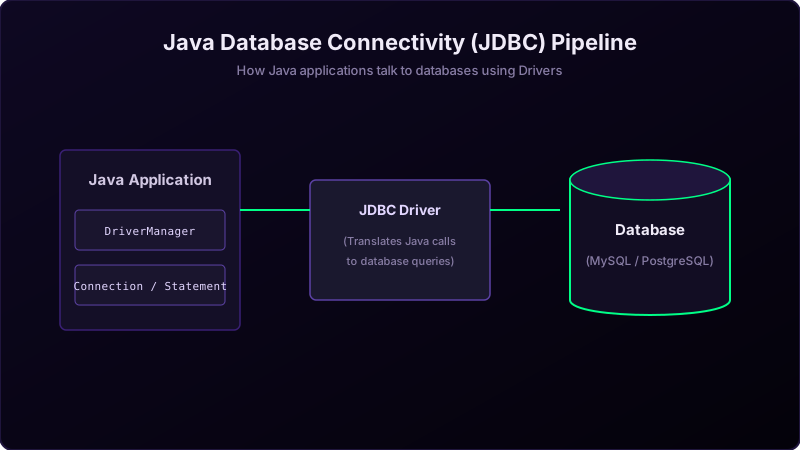
To visualize this architecture, imagine you are a warehouse manager who needs to fetch historical sales ledger books stored inside a highly secure vault (the database) located across town:
- The Translator Operator (
JDBC Driver): The vault clerks only speak a specific foreign language. You hire a translator clerk who knows their language and protocol to translate your requests. - Dialing the Connection (
DriverManager): You call the vault's phone registry. The registry matches your request with the correct translator and establishes a secure, live phone call channel (Connection). - Reading the Script (
Statement): You write down a specific question in SQL and read it over the call. - Writing Down the Clipboard Records (
ResultSet): The clerk opens the vault ledger, reads the rows one-by-one, and dictates them back to you. You write them down on a clipboard ledger block, row-by-row, moving your pencil cursor down the page.
Step-by-Step Connection Lifecycle
- Register the Driver: Load the database driver class (like
com.mysql.cj.jdbc.Driver) into the JVM, registering it with theDriverManager. - Establish the Connection: Provide the connection URL, database username, and credentials to
DriverManager.getConnection(). This creates a TCP socket connection. - Create a Statement: Create a
Statement(orPreparedStatementto prevent SQL injection) representing the query execution container. - Execute and Receive: Call
executeQuery()to run standardSELECTstatements, returning a cursor-basedResultSet. - Process Rows: Loop through the
ResultSetrows usingrs.next(), extracting individual columns by type (likegetInt()orgetString()). - Release Resources: Religiously close the
ResultSet,Statement, andConnectionin afinallyblock or use a try-with-resources statement to avoid socket leaks.
Java Implementation Code
Here is a complete, clean implementation demonstrating how to connect to a local MySQL database and query user records:
package io.practise.myPractice;

import java.sql.Connection;
import java.sql.DriverManager;
import java.sql.ResultSet;
import java.sql.Statement;

public class DataBaseConnectivity {
    public static void main(String[] args) {
        Connection conn = null;
        Statement stmt = null;
        ResultSet rs = null;
        try {
            // Load Driver
            Class.forName("com.mysql.cj.jdbc.Driver");

            // Get Connection
            conn = DriverManager.getConnection("jdbc:mysql://localhost:3306/shop", "root", "password");

            // Create Statement
            stmt = conn.createStatement();

            // Execute SQL query
            rs = stmt.executeQuery("SELECT id, name FROM users");

            // Loop through results
            while (rs.next()) {
                int id = rs.getInt("id");
                String name = rs.getString("name");
                System.out.println("ID: " + id + ", Name: " + name);
            }
        } catch (Exception e) {
            e.printStackTrace();
        } finally {
            // Safely close resources
            try { if (rs != null) rs.close(); } catch (Exception e) {}
            try { if (stmt != null) stmt.close(); } catch (Exception e) {}
            try { if (conn != null) conn.close(); } catch (Exception e) {}
        }
    }
}
Conclusion & Best Practices
Using standard JDBC interfaces ensures database-independent code structure. This makes it simple to swap database systems in the future by switching the target JDBC driver jar and connection URLs. While modern frameworks like Hibernate or Spring Data JPA abstract these low-level calls, understanding raw JDBC is crucial. All higher-level Object-Relational Mapping (ORM) tools compile down to JDBC calls under the hood. Knowing how to manage connections and handle SQL exceptions is key to writing high-performance, resource-efficient backend services.