When writing financial applications, e-commerce checkout systems, or accounting platforms in Java, calculation precision is an absolute requirement, not a luxury. In these contexts, using standard floating-point primitive types like double or float can introduce silent, dangerous rounding errors that lead to financial discrepancies.
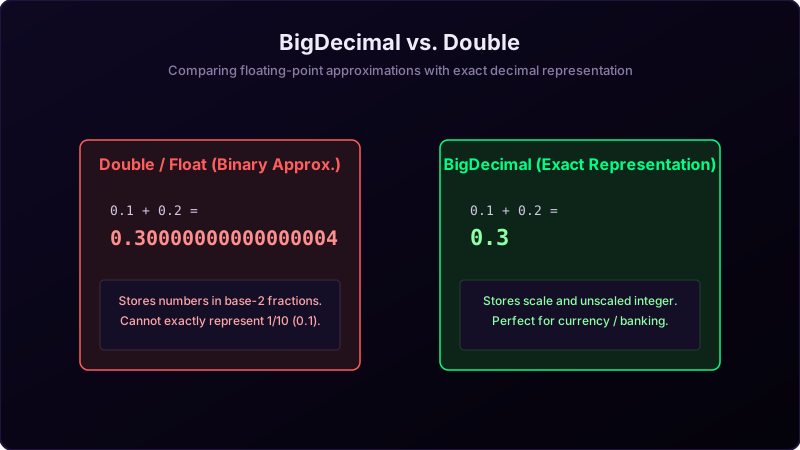
Primitives like double are binary floating-point numbers designed for high-performance scientific simulations and computer graphics, where computational speed is prioritized over exact decimal representation. However, they cannot represent common base-10 decimals like 0.1 or 0.01 exactly. When doing basic arithmetic on double values, we encounter baffling results like 0.1 + 0.2 yielding 0.30000000000000004. Over millions of transactional computations, these tiny trailing fractions compound, leading to massive accounting discrepancies. To solve this, Java provides the BigDecimal class.
To visualize why these rounding errors occur, imagine you are cutting out wooden pieces to build a scale model airplane:
- The Thick Permanent Marker (
double): If you draw your cutting lines using a thick marker, the line has physical width and smudged edges. It is fast and easy to mark, but when you cut along the line, you will be off by a fraction of a millimeter. While this tiny error is negligible for a backyard doghouse, it will prevent a precision model's wings from fitting together. - The Mechanical Pencil and Grid Ruler (
BigDecimal): If you use a sharp mechanical pencil and align your points exactly with a grid ruler, it takes longer to mark and calculate. However, the resulting cuts are mathematically exact down to the micrometer.
double is the marker, and BigDecimal is the precision grid ruler.
Why Binary Floating-Point Fails
The root cause lies in how numbers are stored in memory. A double uses the IEEE 754 standard, representing fractions as binary powers of two (such as 1/2, 1/4, 1/8, and 1/16). Decimals like 0.1 (1/10) cannot be expressed as a finite sum of base-2 fractions. This results in an infinite repeating fraction in binary, similar to how 1/3 (0.3333...) is infinite in base-10. Because computer registers have finite memory, this repeating binary fraction is truncated, introducing a minute rounding error.
Conversely, BigDecimal represents numbers as an unscaled integer (such as 12345) and a scale (such as 2, indicating the decimal point position, representing 123.45). Internally, it performs exact integer arithmetic, ensuring that no base-10 fractions are lost.
Java Implementation Code
Here is a complete Java implementation comparing the subtraction behavior of double against BigDecimal:
package io.practise.myPractice;

import java.math.BigDecimal;

public class BigDecimalClass {
    public static void main(String[] args) {
        // Double issue
        double a = 0.02;
        double b = 0.03;
        double dResult = b - a;
        System.out.println("Double difference: " + dResult); // Prints 0.009999999999999998

        // BigDecimal Solution
        // WARNING: Always use String constructor, NOT double constructor!
        BigDecimal bd1 = new BigDecimal("0.03");
        BigDecimal bd2 = new BigDecimal("0.02");
        BigDecimal bdResult = bd1.subtract(bd2);
        System.out.println("BigDecimal difference: " + bdResult); // Prints 0.01
    }
}
Conclusion & Best Practices
When working with money, interest rates, or tax percentages, never use double or float. Always declare variables as BigDecimal and initialize them using the String constructor (e.g., new BigDecimal("0.1")). Avoid the double constructor (e.g., new BigDecimal(0.1)), as it will import the floating-point rounding error directly into your BigDecimal instance. Additionally, for comparison operations, always use compareTo() rather than equals(), since equals() considers scale (making 0.1 and 0.10 unequal), whereas compareTo() compares mathematical value.