In web operations, system administration, and cybersecurity, server log analysis is a vital task. Every time a client makes a request to a web server or load balancer, the system logs details about the transaction, including the client's IP address.
A common operational task is parsing these log files to identify the most active IP address—the one sending the highest frequency of requests. This information is critical for performance monitoring, rate-limiting configurations, and identifying potential security threats like brute-force logins or Distributed Denial of Service (DDoS) attacks.
In this tutorial, we will explore how to solve this problem efficiently in Java using a HashMap to record frequencies and track the most frequent IP address in a single pass.
To understand how this algorithm works, picture a class president election. Students walk past a ballot box and drop paper ballots containing their votes.
To count the votes, the election monitor uses a blackboard with a tally list:
- The monitor pulls a ballot from the box.
- If the candidate's name is not yet written on the board, the monitor writes the name down and draws a single tally mark next to it (representing a request count of
1). - If the name is already on the board, the monitor adds a new tally mark to their count.
- Throughout the process, the monitor keeps a note card with the name of the candidate who currently has the most tallies. If a candidate's tally exceeds the card's value, the card is updated.
- At the end of the counting process, the name on the note card is declared the winner.
HashMap ledger, and the candidate with the most tallies is our most frequent IP address.
Technical Strategy
We can implement this logic in Java with high efficiency:
- HashMap Frequency Map: We initialize a
HashMap<String, Integer>where keys are IP addresses and values are their corresponding request counts. - Single-Pass Evaluation: Instead of looping twice (once to count, and once to find the maximum), we can update the maximum value dynamically. As we process each IP address:
- We fetch the current count of the IP using
map.getOrDefault(ip, 0). - We increment the count by
1and save it back into the map. - We immediately compare the updated count against a running
maxCountvariable. If it is greater, we update bothmaxCountandfrequentIp.
- We fetch the current count of the IP using
Step-by-Step Scenario Trace
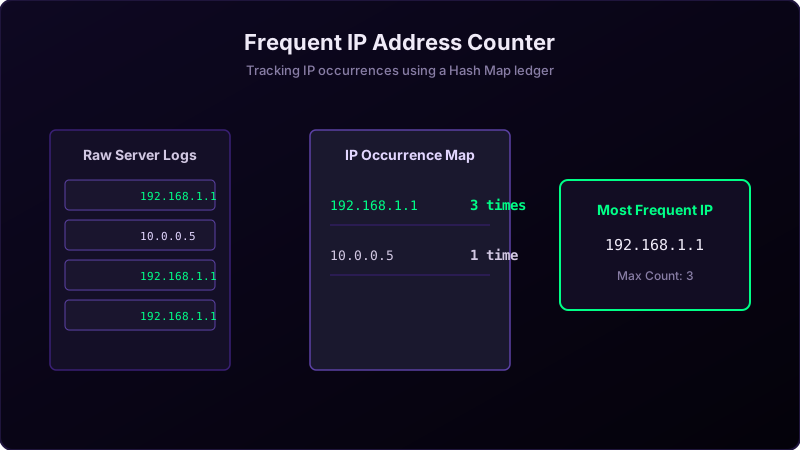
Let's trace the logic with a sample logs array: ["192.168.1.1", "10.0.0.5", "192.168.1.1", "172.16.254.1", "10.0.0.5", "192.168.1.1"]:
- First IP ("192.168.1.1"): Not in map. Count becomes
1. Map:{"192.168.1.1": 1}. Since1 > 0,maxCount = 1,frequentIp = "192.168.1.1". - Second IP ("10.0.0.5"): Not in map. Count is
1. Map:{"192.168.1.1": 1, "10.0.0.5": 1}. Count1is not greater thanmaxCount (1). No change to trackers. - Third IP ("192.168.1.1"): Already in map. Count becomes
1 + 1 = 2. Map:{"192.168.1.1": 2, "10.0.0.5": 1}. Since2 > 1,maxCount = 2,frequentIp = "192.168.1.1". - Fourth IP ("172.16.254.1"): Count is
1. Map:{"192.168.1.1": 2, "10.0.0.5": 1, "172.16.254.1": 1}. No change to trackers. - Fifth IP ("10.0.0.5"): Count becomes
1 + 1 = 2. Map:{"192.168.1.1": 2, "10.0.0.5": 2, "172.16.254.1": 1}. Count2is not greater thanmaxCount (2). No change. - Sixth IP ("192.168.1.1"): Count becomes
2 + 1 = 3. Map:{"192.168.1.1": 3, "10.0.0.5": 2, "172.16.254.1": 1}. Since3 > 2,maxCount = 3,frequentIp = "192.168.1.1".
192.168.1.1 with 3 requests.
Java Implementation Code
Below is the complete Java code demonstrating how to calculate the most frequent IP address from a log dataset.
package io.practise.myPractice;

import java.util.HashMap;
import java.util.Map;

public class FrequentIPAddress {
    public static void main(String[] args) {
        String[] logs = {
            "192.168.1.1", "10.0.0.5", "192.168.1.1",
            "172.16.254.1", "10.0.0.5", "192.168.1.1"
        };

        Map<String, Integer> ipCounts = new HashMap<>();
        String frequentIp = "";
        int maxCount = 0;

        for (String ip : logs) {
            int count = ipCounts.getOrDefault(ip, 0) + 1;
            ipCounts.put(ip, count);

            if (count > maxCount) {
                maxCount = count;
                frequentIp = ip;
            }
        }

        System.out.println("Most frequent IP: " + frequentIp + " (" + maxCount + " requests)");
    }
}
Conclusion & Complexity Analysis
By executing counting and max checks concurrently inside a single loop, we achieve O(N) linear time complexity and find the target IP in one pass. It uses O(U) space complexity (where U is the number of unique IP addresses), making it highly efficient for production environments analyzing large log files.