In multi-threaded Java applications, synchronization is the traffic controller. When multiple threads try to update the same variable or write to the same file simultaneously, it leads to data corruption (race conditions). To prevent this, Java uses locks.
But Java doesn't give you just one lock; it gives you a whole tool belt. If you pick the wrong lock, your application could run slow, freeze up under pressure (deadlock), or exhaust system memory. In this guide, we will compare synchronized, ReentrantLock, ReadWriteLock, and StampedLock in layman terms, with code snippets showing exactly when to use each.
1. synchronized: The Guarded Bathroom
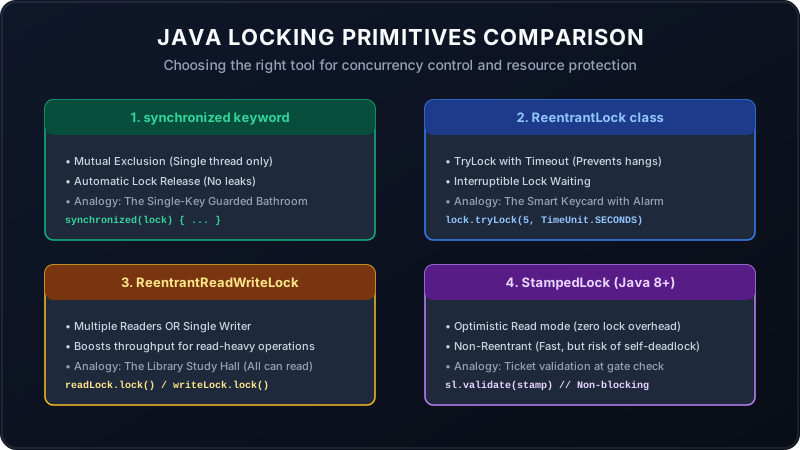
This is the built-in, language-level lock. Think of it as a single-person bathroom at a cafe. There is one key hanging on the wall. When a thread enters, it takes the key and locks the door. Other threads must queue up in a line outside until the first thread exits and puts the key back.
Code Justification:
public class CafeCounter {
    private int coffeeCount = 0;

    // Fully managed by JVM. Auto-locks and auto-releases.
    public synchronized void orderCoffee() {
        coffeeCount++;
    }
}
When to use: Use this as your default choice. It is simple, readable, and **foolproof**—because the JVM automatically unlocks the door even if the thread crashes or throws an exception inside.
2. ReentrantLock: The Smart Keycard Door
This is a programmatic explicit lock. Think of it as a high-tech secure door. Instead of waiting forever in line, a thread can check: "I will try to open the door. If it is locked, I'll wait exactly 3 seconds. If it's still locked, I will walk away and do other work instead of waiting forever."
Code Justification:
import java.util.concurrent.locks.ReentrantLock;
import java.util.concurrent.TimeUnit;

public class HighTrafficService {
    private final ReentrantLock lock = new ReentrantLock();

    public void processPayment() throws InterruptedException {
        // Try to get the lock. If unavailable for 2 seconds, fail fast!
        if (lock.tryLock(2, TimeUnit.SECONDS)) {
            try {
                // Perform thread-safe critical task
                System.out.println("Processing payment...");
            } finally {
                lock.unlock(); // WARNING: Must release manually in finally block!
            }
        } else {
            System.out.println("Server busy, payment timed out. Try again later.");
        }
    }
}
When to use: Use this when you are building responsive systems (like API endpoints) where you cannot afford to have threads block indefinitely. The timeout prevents thread pile-up under heavy production spikes.
3. ReadWriteLock: The Library Reading Room
A standard lock (like synchronized or ReentrantLock) blocks everyone. But what if threads only want to read data? Reading doesn't corrupt data; only writing does. Think of this as a library reading room. 100 students can enter and read books at the same time (shared read lock). But if a painter wants to paint the walls (exclusive write lock), everyone must exit until the painting is done.
Code Justification:
import java.util.concurrent.locks.ReentrantReadWriteLock;

public class SharedMemoryCache {
    private final ReentrantReadWriteLock rwLock = new ReentrantReadWriteLock();
    private String cachedConfig = "Default";

    // Multiple threads can call this concurrently without blocking!
    public String readConfig() {
        rwLock.readLock().lock();
        try {
            return cachedConfig;
        } finally {
            rwLock.readLock().unlock();
        }
    }

    // Only one thread can call this, blocking all readers and other writers.
    public void updateConfig(String newConfig) {
        rwLock.writeLock().lock();
        try {
            this.cachedConfig = newConfig;
        } finally {
            rwLock.writeLock().unlock();
        }
    }
}
When to use: Use this for data structures that are **read-heavy but write-rare** (e.g., configurations, cache maps, catalog items). Do not use this if you write frequently, as coordinating read/write state counts has its own CPU overhead.
4. StampedLock: The Digital Version Stamp
Even `ReadWriteLock` has a bottleneck: readers still block writers. `StampedLock` introduces an **Optimistic Read Mode**. Think of this as taking a digital ticket version. You read the data immediately *without* acquiring any lock. Right before using the data, you check: "Has the version ticket changed since I read it?" If a writer has updated the version, you fall back to a traditional, heavy read lock.
Code Justification:
import java.util.concurrent.locks.StampedLock;

public class HighPerformanceCoordinate {
    private final StampedLock sl = new StampedLock();
    private double x, y;

    public double getDistance() {
        long stamp = sl.tryOptimisticRead(); // Non-blocking version stamp!
        double currentX = x;
        double currentY = y;

        // Verify if a write occurred since we fetched the stamp
        if (!sl.validate(stamp)) {
            // FALLBACK: Acquire a standard, blocking read lock instead
            stamp = sl.readLock();
            try {
                currentX = x;
                currentY = y;
            } finally {
                sl.unlockRead(stamp);
            }
        }
        return Math.sqrt(currentX * currentX + currentY * currentY);
    }
}
When to use: Use this when you have extreme read contention on small data blocks and need maximum performance. **Warning:** `StampedLock` is **non-reentrant** (a thread cannot call it recursively, or it will self-deadlock) and is complex to write, so reserve it for highly tuned systems.
Summary Matrix
| Lock Type | Analogy | Best Used For... |
|---|---|---|
| synchronized | Cafe Bathroom (One Key) | Simple tasks, default synchronization, local safety. |
| ReentrantLock | Smart Keycard Door | High-traffic services, timed retry, interruptible queues. |
| ReadWriteLock | Library Reading Room | Read-heavy caches (e.g. 95% reads, 5% updates). |
| StampedLock | Ticket Validation Gate | Microsecond performance bottlenecks, non-blocking reads. |