Apache Kafka has become the gold standard for real-time, distributed event streaming. Its partition-based architecture allows systems to process millions of events per second with high fault tolerance. However, because Kafka relies on client-side control and complex broker coordinations, even minor configuration oversights can result in massive production bottlenecks, data corruption, or total system stalls. Developers transitioning from traditional message queues (like RabbitMQ) often fall victim to common traps that degrade cluster performance. In this guide, we will analyze the three most critical Kafka pitfalls—hot partitions, rebalance storms, and premature offset commits—and detail how to optimize client configurations to prevent them.
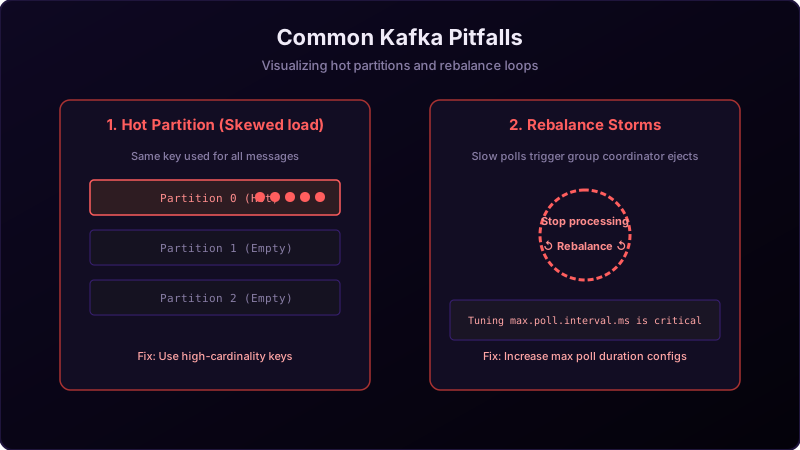
To visualize these pitfalls, imagine a busy bank vestibule:
- Hot Partitions (Skewed Queuing): The bank vestibule has 4 deposit counters. A security guard guides customers based on the first letter of their last name. However, 90% of the city's residents have last names starting with "S". Counter 1 becomes overloaded with a massive line, while the other 3 counters sit completely empty.
- Rebalance Storms (The Indecisive Teller): A teller at Counter 1 takes too long to process a customer's complex transaction. The head office immediately assumes the teller has quit, shuts down the counter, and redistributes all waiting customers to other lines (a rebalance). Just as the other lines settle, the teller returns. Head office re-opens the counter and shuffles everyone *again*. No actual work gets done because customers are constantly shifting lines.
Pitfall 1: Hot Partitions & Load Skewing
A Hot Partition occurs when one partition inside a topic receives a disproportionately high volume of messages. Since a single partition can only be read by a single consumer thread within a group, this overload causes massive consumer lag on that specific thread, leaving other CPU cores under-utilized.
- The Cause: Poor partition key selection. If you partition a global order stream by
countryCode, and 95% of your sales originate in theUS, the partition mapping the hash of "US" will choke. - The Solution: Use high-cardinality partitioning keys containing unique ID variables (like
transactionId,userId, or a compound key likecountryCode_timestamp) to ensure a uniform distribution across the cluster.
Pitfall 2: Rebalance Storms & Consumer Evictions
A Rebalance Storm occurs when a consumer group repeatedly triggers rebalances, halting message consumption across all active partitions during each coordination phase.
- The Cause: Processing lag exceeding
max.poll.interval.ms. If a consumer fetches a large batch of records via.poll()and takes longer to process them than this configured interval, the coordinator assumes the consumer thread is dead, evicts it from the group, and triggers a rebalance. When the consumer finally finishes its work and polls again, it is forced to rejoin, triggering yet another rebalance. - The Solution: Throttle your consumers. Decrease
max.poll.recordsto pull smaller, manageable batches, or increasemax.poll.interval.msto give threads adequate breathing room. For stateful consumers, configure Static Membership by assigning a uniquegroup.instance.idto prevent rebalances during brief client restarts.
Pitfall 3: Premature Offset Commits & Silent Data Loss
Committing offsets immediately after fetching messages, before they are processed by the business logic, is a recipe for silent data loss.
- The Cause: If a consumer fetches a batch, commits the offset (moving the read bookmark forward), and subsequently crashes or throws a database exception during processing, those messages are lost. When the consumer restarts, it resumes reading from the committed offset, skipping the unprocessed messages.
- The Solution: Implement the Process-then-Commit pipeline. Disable auto-commit (
enable.auto.commit = false) and manually commit offsets (commitSync()orcommitAsync()) only *after* all records in the batch have been successfully written to the database or downstream service.
Conclusion & Best Practices
Operating Kafka successfully in production requires matching client configurations to your application's processing profiles. By utilizing high-cardinality keys, tuning poll sizes to match thread speeds, and committing offsets only after successful execution, you build a resilient, high-throughput event-driven pipeline.